For bedtime
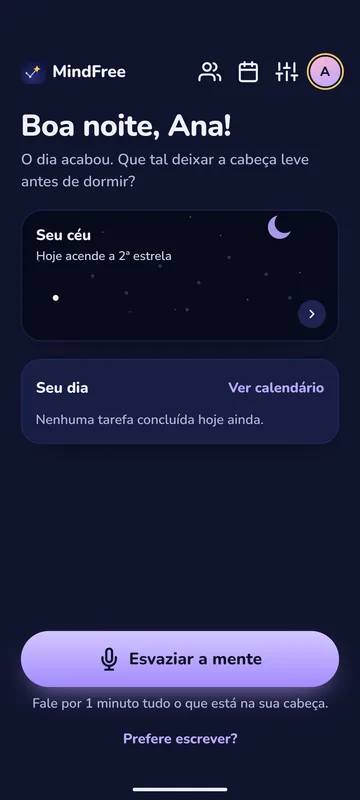
Before bed, say what is on your mind. In the morning, it is all organized.
MindFree turns one minute of your voice into tasks with a day, a time and a reminder. You clear your mind and go to sleep without the fear of forgetting.
Android is in closed testing, on its way to Google Play. iPhone comes next.
How it works
Three steps, one minute a night.
-
Step 1
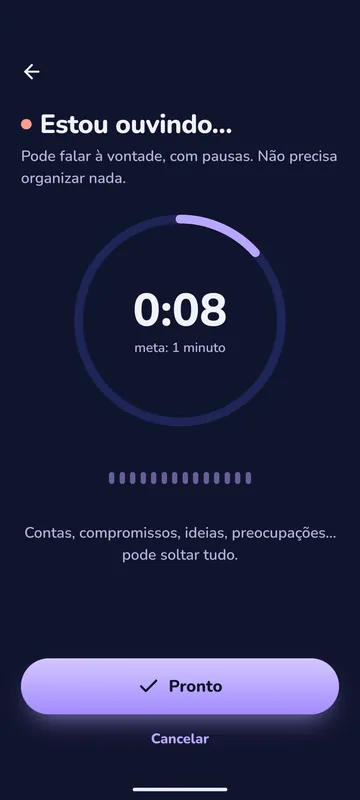
You talk
At night, at the time you choose, the app calls you. Talk for about a minute, your way, with pauses and repetitions. If you prefer, write.
-
Step 2
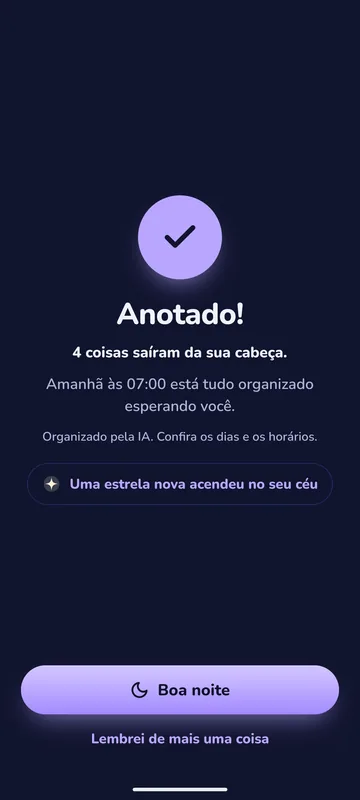
AI organizes
Speech becomes text, and text becomes tasks with a day and a time. “Tomorrow at 3” becomes tomorrow at 15:00. “Friday” becomes Friday.
-
Step 3
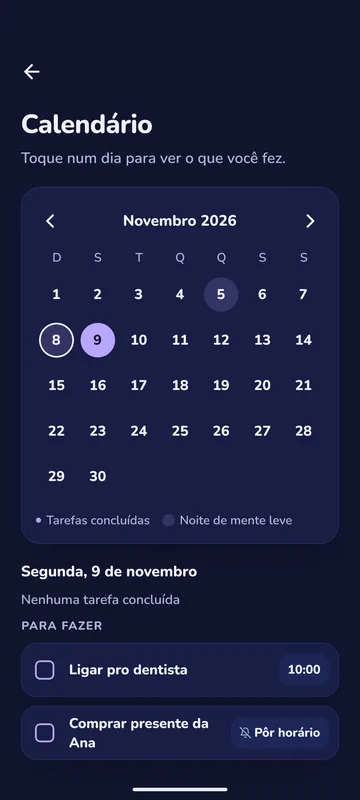
Easy morning
In the morning, your day’s summary arrives. Every task with a time reminds you at the right minute, and you check things off on the home screen, in the calendar or from the widget.
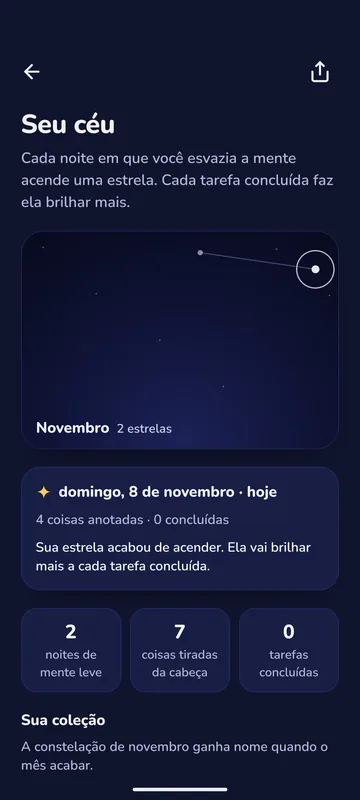
Your sky
Every night you clear your mind lights a star.
- Every task you complete from that night makes the star brighter.
- At the end of the month, the stars become a named constellation, and your collection grows.
- Skipped a night? That is fine. The sky never goes dark.
With friends, if you want
Create an account, pick a handle and follow the people you like. Your friends see only your stars: the days you lit one, never what you said or your tasks.
Sparkle and nudge
A sparkle for someone who lit a star today, a friendly nudge for someone who has not yet.
Wall of achievements
A completed task, with a photo and a caption. The post disappears after 7 days.
In your control
A private account that approves who follows, with block and report always at hand.
Your data is yours
MindFree was made for the most personal moment of the day. So:
No account, everything on your phone
Tasks, recordings and settings stay only on your device. Creating an account is optional.
AI only steps in if you let it
A recording only leaves your phone if you turn on AI organizing. Before the first time, the app shows what goes, to whom and what for.
What you said stays with you
The audio and the text of what you said stay only on your phone, even with an account. Our server keeps neither.
No ads, no trackers
We do not sell data, show ads or build profiles about you.
Export and delete
Take your data in a file or delete everything, including your account, right in Settings.
MindFree Plus Coming soon
MindFree is free and stays free. Plus will be an optional subscription for those who want more.
Premium transcription
A larger voice model that better understands quiet, tired speech and noisy rooms.
Night history with search
Reread what you said on any night and find anything by a single word.
Everything that exists today stays free forever. Nothing is charged without your consent in the store. Price and date are still to be announced.
Get notified
Leave your email and we will let you know when MindFree reaches the stores and when Plus launches. Only those notices, no newsletter.
Frequently asked questions
Is MindFree free?
Yes. Everything that exists today is free and stays free. AI organizing has a daily limit per person. Plus, an optional subscription, comes later.
Do I need an account?
No. Without an account, everything stays only on your phone. With an account, by email or with Google, tasks and settings go to the cloud, and you can use Friends’ sky.
What does the AI receive?
Only that night’s recording or text, and only if you turn on AI organizing. The audio goes to OpenAI to become text, and the text goes to Anthropic to become tasks. Under their current policies, this data does not train models and is deleted within 30 days.
Does it work without AI?
Yes. An organizer on the phone itself understands days and times in written text, and recordings are kept to be organized later.
Which languages?
Twelve: Portuguese (Brazil and Portugal), English, Spanish, French, German, Italian, Japanese, Korean, Chinese, Hindi and Arabic.
When does it launch?
Android is in closed testing and heading to Google Play. The iPhone version comes next. Join the list and we will let you know.
Is there a minimum age?
To create an account and use the friends network, 13 years old.